Baby growth chart, WHO percentiles, and vaccine tracker
Your baby grows fast. Keep every inch, ounce, and shot in one record the whole family shares.
Log a weight in seconds and see the WHO percentile. Mark each shot and get a reminder before the next one is due. Your partner and the grandparents see it all on their own phones.


Free for one child. No ads on any plan.
"Did you log her weight?"
For most families the numbers end up in three places: a paper card in the diaper bag, a clinic portal that only one parent can open, and whichever phone was closest at the last weigh-in. TotBuddy keeps one record for each child, and everyone who looks after that child can read it and add to it.
Growth charts: WHO Child Growth Standards, birth to 5 years, and the WHO Growth Reference to 19 years
Schedules: CDC, UKHSA, PHAC, Australia's NIP, and India's UIP
Growth
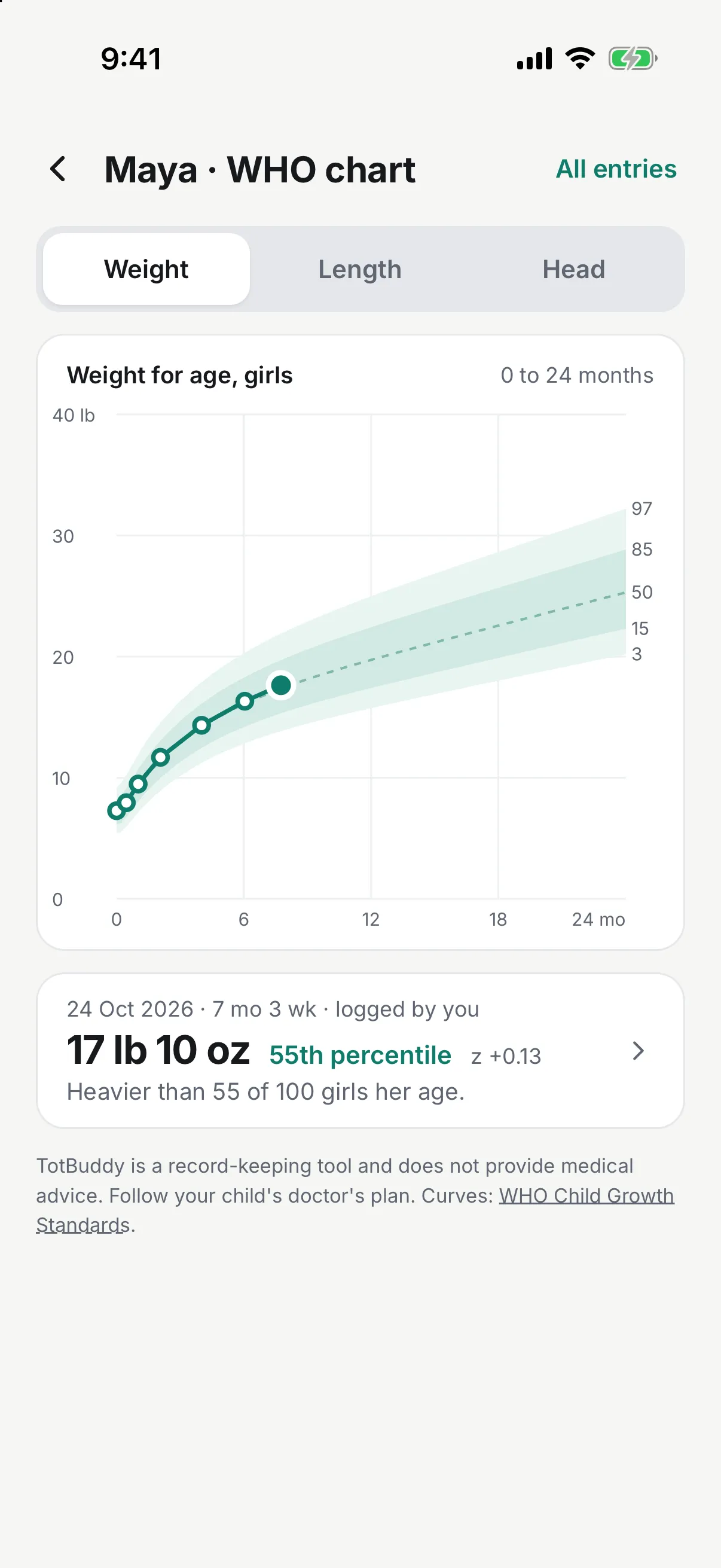
See where your child sits on the WHO curves
Each measurement lands on the WHO Child Growth Standards with its percentile and one sentence you can read without a chart key, such as "Heavier than 55 of 100 girls her age."
- Weight, length or height, and head circumference
- Corrected age for babies born before 37 weeks, until their second birthday
- Pounds and ounces or kilograms, inches or centimeters
Free on every plan
Bring one page to the checkup
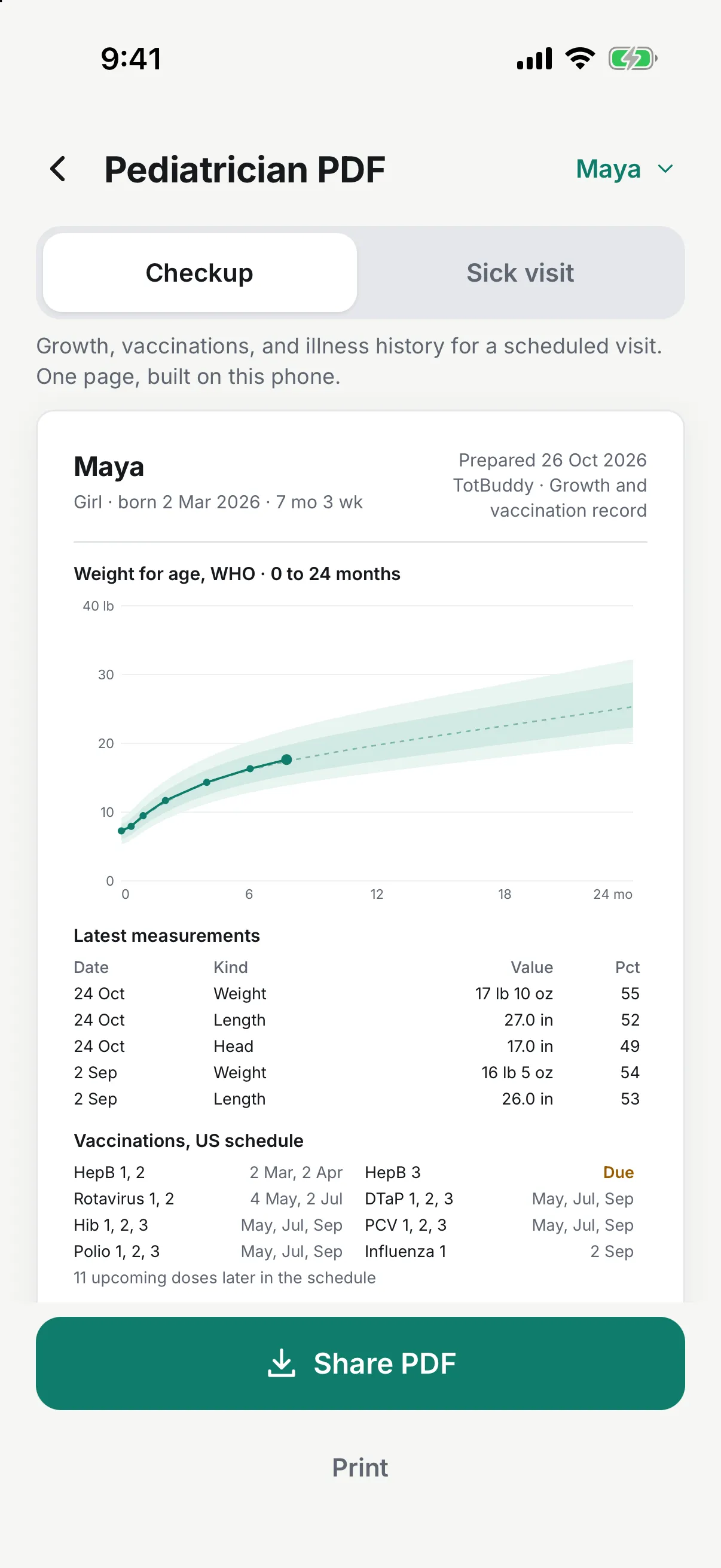
Tap Share with doctor to make a one-page PDF with the growth chart, the latest measurements, vaccination status, and recent sick days. If your child is ill right now, the page opens with the current illness first, so urgent care sees the dates and temperatures before anything else.
You can print it, email it, or hand the doctor your phone.
Vaccinations
Know which shot is next
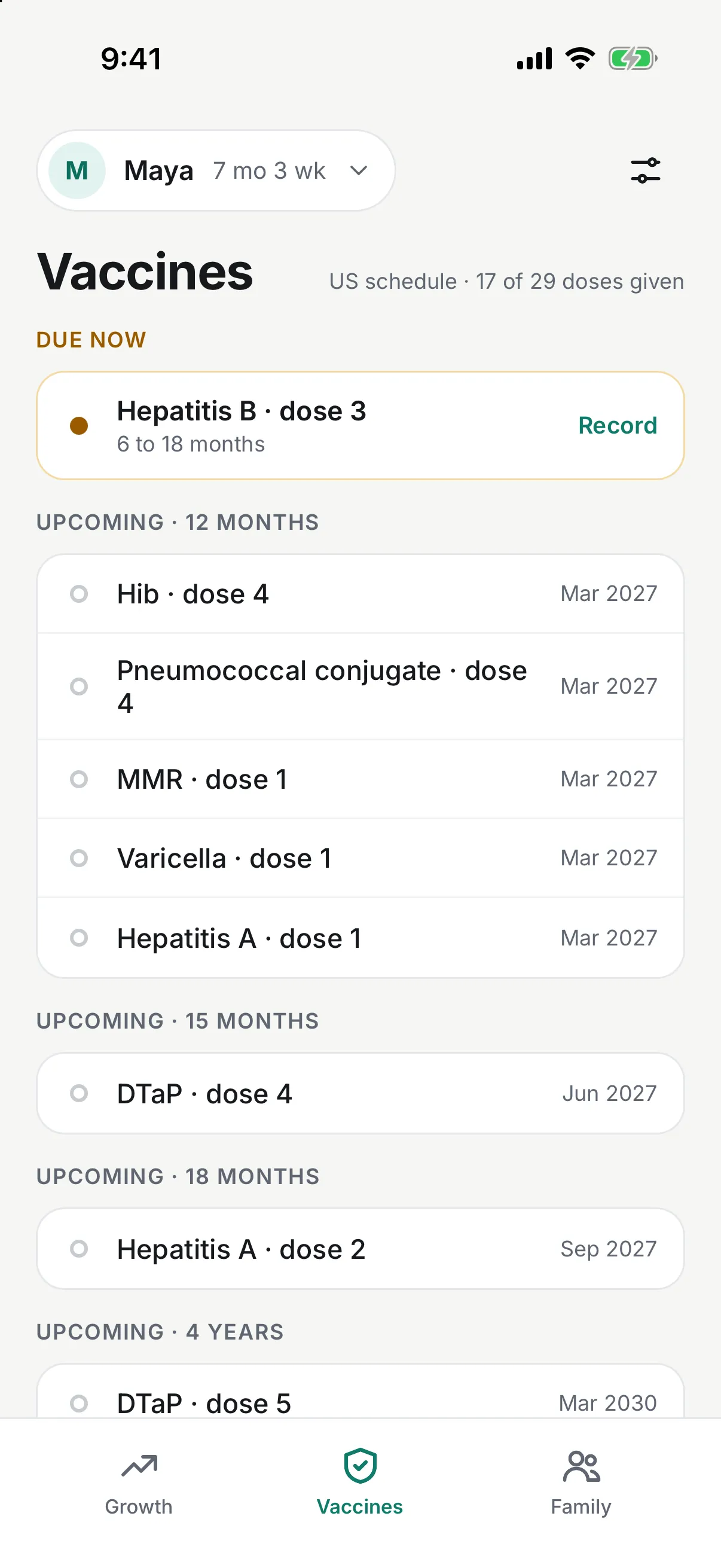
TotBuddy loads the routine schedule for your country and shows each dose as given, due, or coming up. When a window opens, a reminder names the vaccine and the dates.
- Schedules for the US, the UK, Canada, Australia, and India
- Mark a dose given in one tap, with the date from the clinic
- Starting with an older child? Track from today, and earlier doses won't show as overdue
Sick days
Write down the sick days while you still remember them
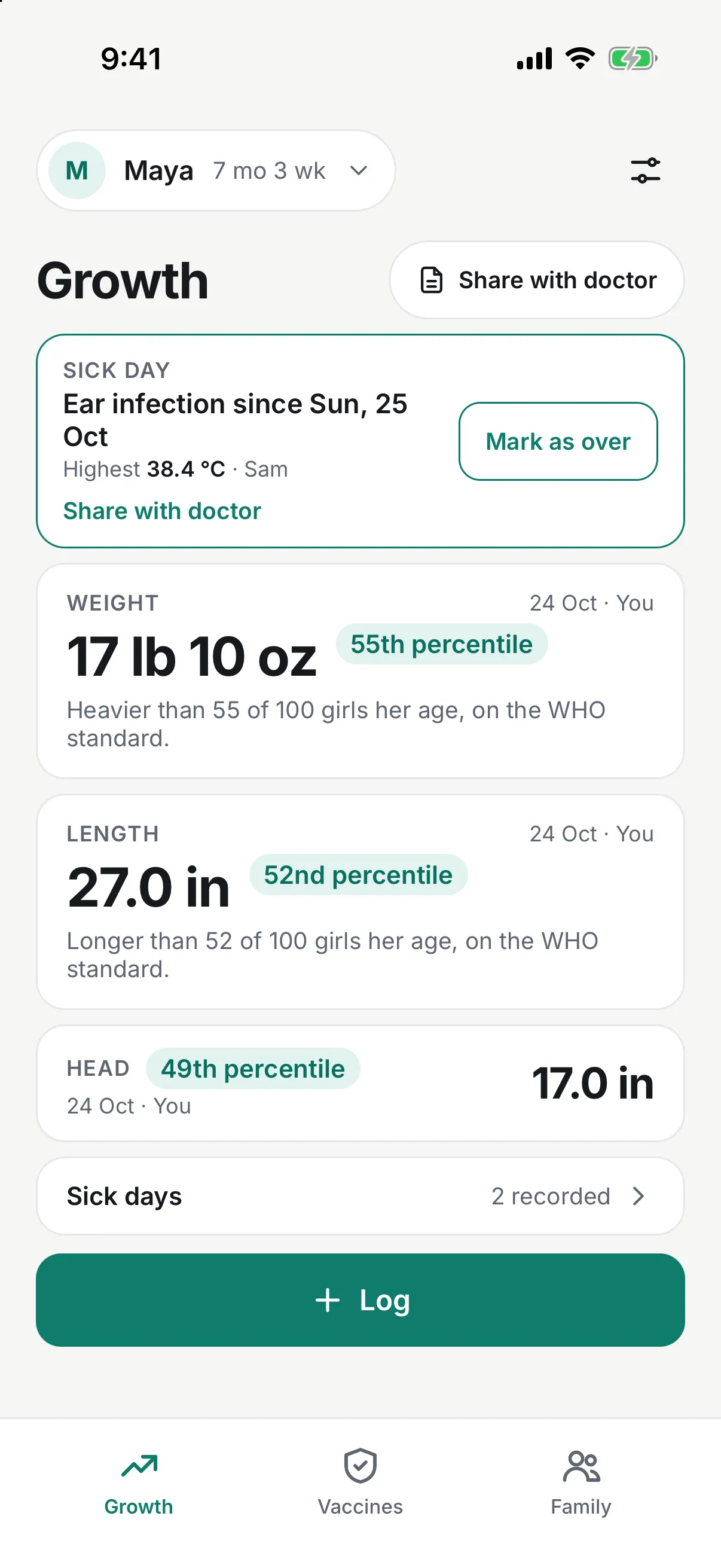
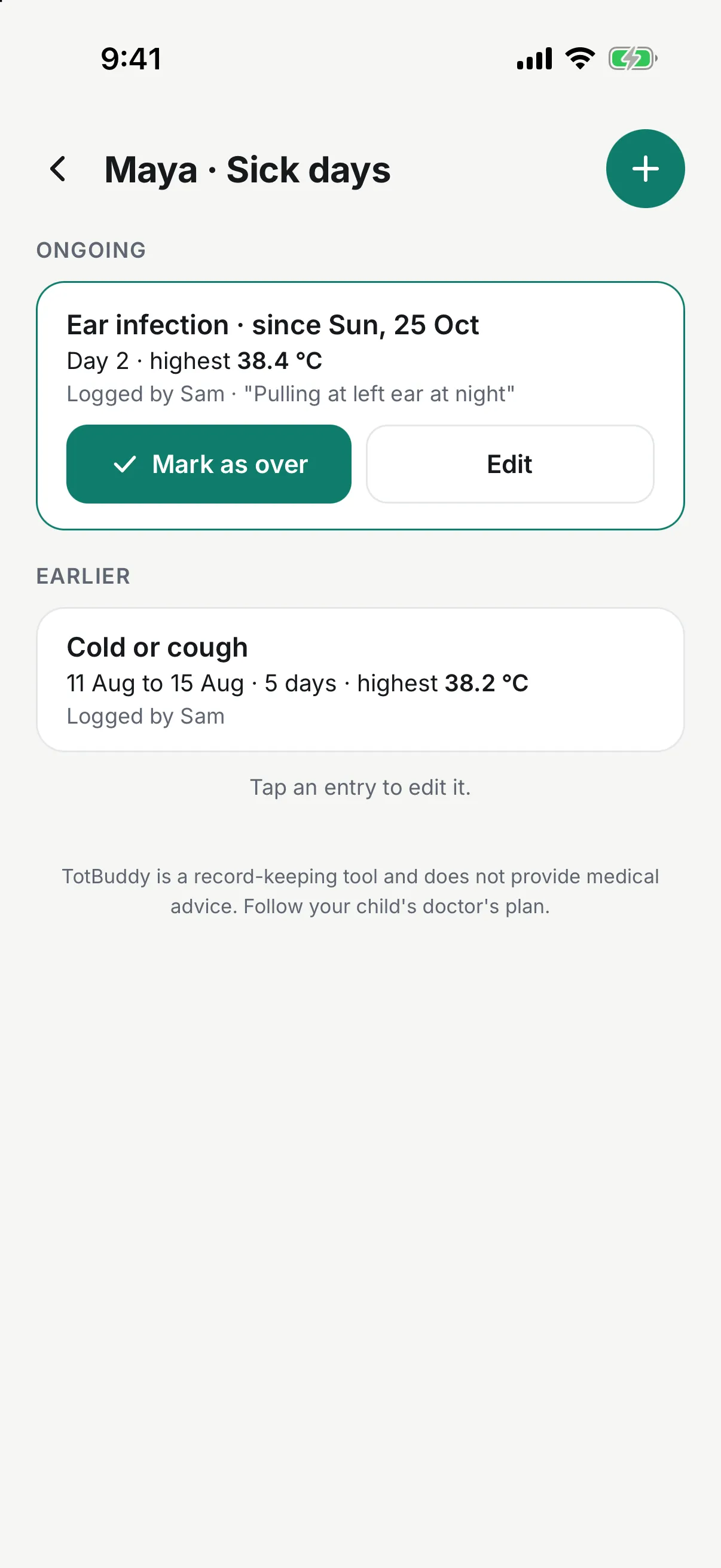
When your child is ill, log what it is, the day it started, and the highest temperature you measured. Your partner sees it before daycare pickup, and at the next checkup you have dates instead of guesses.
- Fever, cold or cough, ear infection, stomach bug, rash, or your own label
- Every entry shows who logged it and when
- TotBuddy keeps the temperature exactly as you typed it and never rates it
Family sharing
Everyone who helps, on the same record
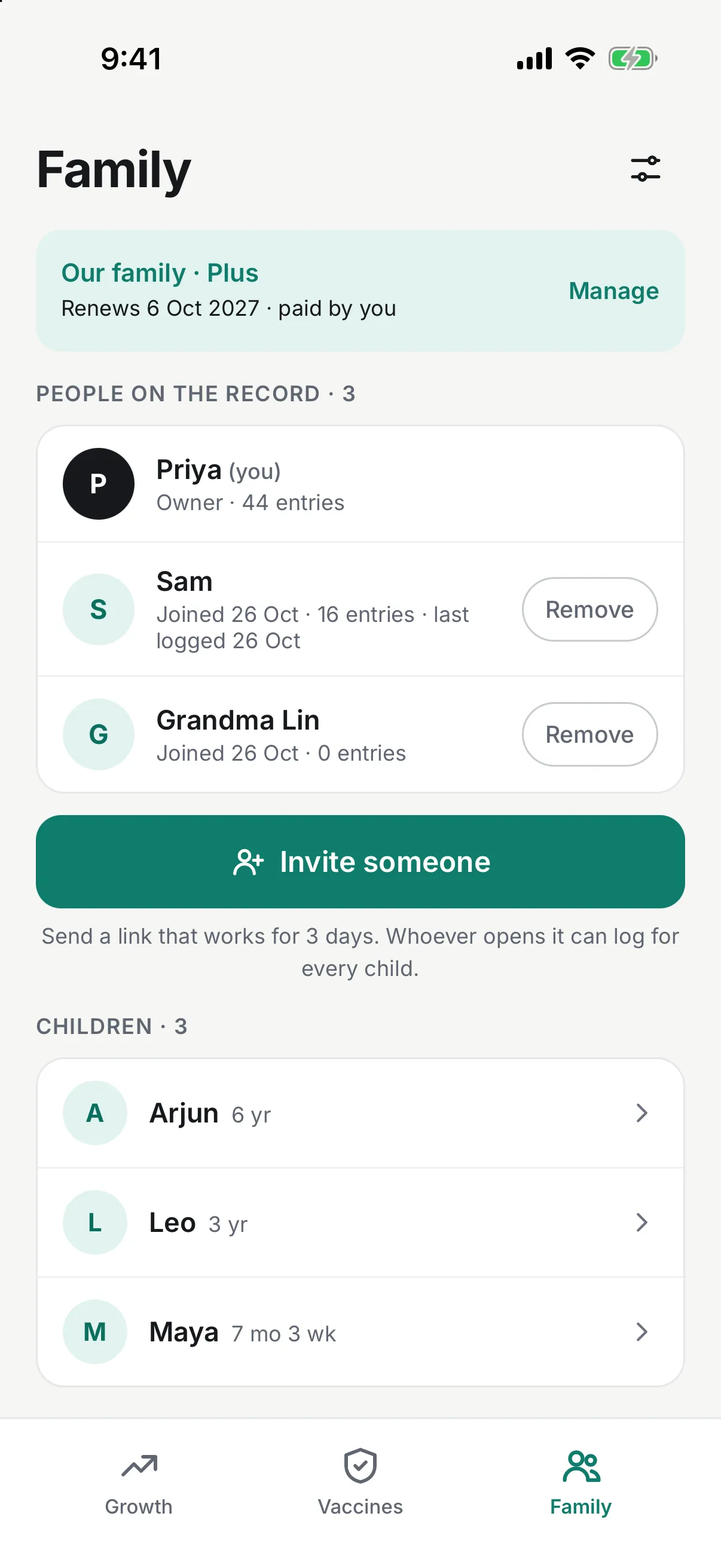
Send an invite link to your partner, your parents, or the nanny. They log from their own phones, and every entry shows who added it. You can remove anyone at any time.
- Unlimited caregivers on Plus, and everyone can log
- iPhone and Android phones share one record
- A new entry usually reaches the other phones within a minute
Set it up before the next checkup
Add your child
Enter a name, birth date, and sex. If your baby came early, add the weeks at birth too.
Log the last checkup
Copy the numbers from the clinic printout. Each one gets its WHO percentile as you save it.
Invite who helps
Send a link to your partner or parents. They see the same record on their own phone.
The judgment is left to your doctor
Numbers without labels
TotBuddy plots each measurement against the published WHO standard and shows the percentile. It never puts a label on your child or on a number.
Private to your household
Records are stored encrypted and shared only with the people you invite. TotBuddy never sells them or uses them for advertising.
Nothing in the way
There are no ads on any plan and no third-party trackers. The app asks you to upgrade only when you invite someone or add a second child.
Free for one parent. One plan for the whole family.
Free
$0
One child, one person
- WHO growth charts with percentiles
- Vaccination schedule and reminders
- Sick days
- Pediatrician PDF
Plus
$29.99 a year
or $69.99 once for lifetime
- Everything in Free
- Unlimited children
- Unlimited caregivers, each on their own phone
- One purchase covers everyone in the household
Questions parents ask
My pediatrician already records this. Why keep my own record?
The clinic's portal shows the numbers after each visit, usually to one account. TotBuddy also holds the weigh-ins you do at home between visits, and your partner sees the same chart on their own phone the day you log it.
Does it work if one of us has an iPhone and the other has Android?
Yes. The record lives on TotBuddy's servers, not on one phone, so an iPhone and an Android phone show the same entries. You sign in with Apple on an iPhone and with Google on Android.
Do the grandparents have to pay too?
No. One Plus plan covers the whole household, whoever buys it. Everyone you invite logs for free.
What happens if we stop paying for Plus?
Nobody loses anything. Everyone stays on the record and keeps logging for every child. You can't invite someone new or add another child until you buy Plus again.
Will TotBuddy tell me whether my baby's growth is OK?
No. TotBuddy shows the percentile and z-score from the WHO standards, with a plain sentence that explains the number. Whether a number needs attention is a question for your child's doctor.
Is my child's data private?
Your records are stored encrypted on Cloudflare and shared only with the people you invite. TotBuddy never sells them or uses them for advertising, and the app has no third-party trackers. You can export everything as a file or delete your account from Settings.